 is displayed besides the View Name in
the View Editor form.
is displayed besides the View Name in
the View Editor form.Views are used to list tickets or task filtered in some way, e g all in progress, all assigned to you, all of a specific type, recently solved, etc. Tickets or tasks shown in the views are called entities in NSP. In this function you can edit, clone, deactivate, set permissions or delete the views.
Views are divided into System views and views defined by
user. System views are a standard set of predefined views included in NSP. For a
System View, the text is displayed besides the View Name in
the View Editor form.
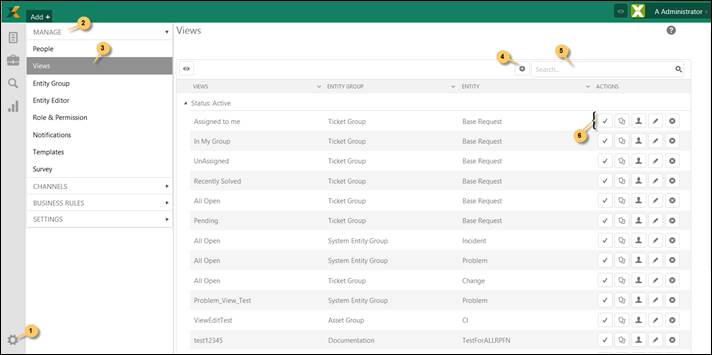
To access Views page, go to Configurations > Entity Management > Views.
The page mainly contains a list of views, Add new record button (4) to define a new view and a search box to search among the available views. The view list also provides an option to sort the views using the column menu options.
Views
The Views list contains Active views followed by Inactive views. Each view in the list has Actions available. The actions include (6):
 Activate – Activate or deactivate the view.
 Clone – Creates a copy of the view.
 Permissions – Change the view access permissions. Select
required scope for the view.
Permissions – Change the view access permissions. Select
required scope for the view.
 Edit – Used to edit the view. Opens the View Editor for the view. It is the same form used to
Add a View.
Edit – Used to edit the view. Opens the View Editor for the view. It is the same form used to
Add a View.
 Delete – Delete view.
NSP provides a set of pre-defined views. These views are referred as System Views in NSP and they do not contain filter criteria. The System Views are (for each ticket type):
•Assigned to me
•In My Group
•UnAssigned
•All Open
•All Closed
To select a view in NSP:
Click the Task & Ticket
lists icon ( ) in the left sidebar. Then select any of the
views from the list of views or
) in the left sidebar. Then select any of the
views from the list of views or