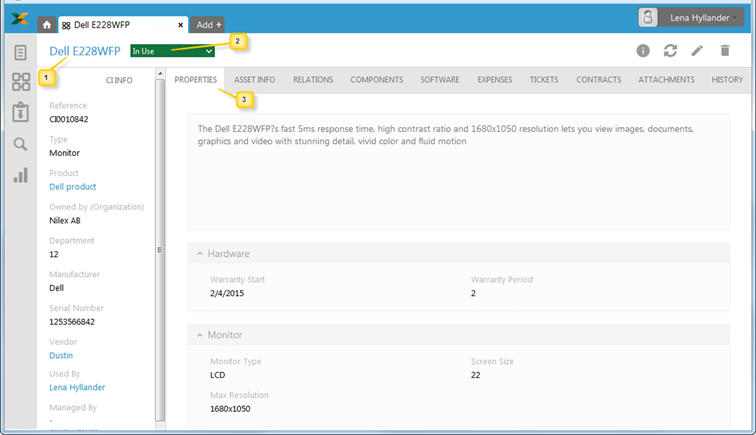
CI Form is a detailed view of a CI. It will contain all properties, components, relations, financial information and changes history (lifecycle tracking), audit history, as well as view of the tickets associated with the given CI. This view is also used to edit the CI.
CI View
The CI form consists of three main areas:
•CI View Header: Shows Name (1), the Status dropdown (2).
•Left panel: General CI information, common for all CI Types.
•Tabs (3): Additional CI information grouped in a tabbed user interface. Which tabs are displayed depend on CI Type. For detail description search for tab name.
Above tabs in right corner are Info, Refresh, Edit and Delete buttons. Which offers possibility of refreshing list, editing or deleting CI.

Left Panel
Panel of the form contains general information respectively the default properties of CI. All fields are shown in panel is non-editable, auto generated field with a single value. When you click the fields: Product, Vendor, Used by, Managed by and Location a popup shows information about selected property.