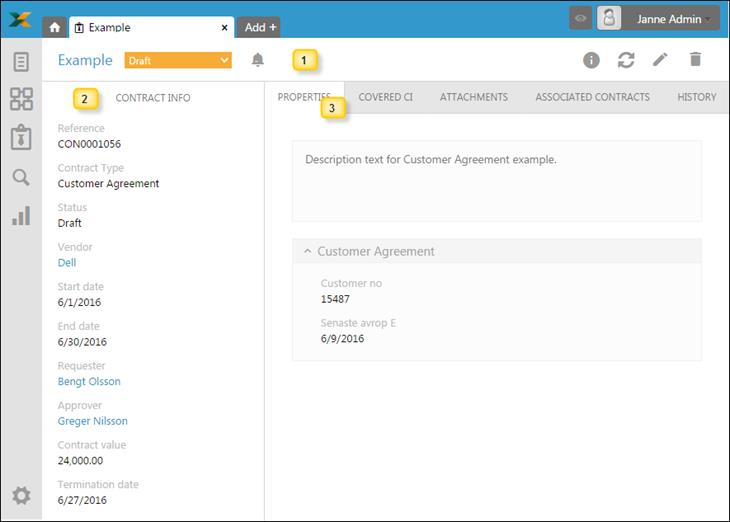
Contract form displays all details of a contract. It contains tabs for Properties, Covered CIs, Attachments, Associated Contracts and History (lifecycle tracking and properties changes history).
Contract From
Contract Form is divided in three main areas:
1. Contract Form header: Contains additional function related to Contract, see below.
2. Left panel: Contains general Contract properties, properties that are common for all Contract types, see below.
3. Contract Form Tabs: Additional Contract information separated in groups in a tabbed UI, depending on Contract type.
Contract Form Header
In the header part (1) you find the Name of Contract, the
Status dropdown which is used for quick Status changes, and a symbol,  , used to define which Notifications should be activated connected to the Contract.
If contract has Pending Approver status, and contract view is opened by Approver, another two action links will be displayed in header: Approve and Reject.
Above tabs in right corner are Info, Refresh, Edit and Delete button. Which offers possibility of reading help text, refreshing list, editing or deleting Contract.

Left Panel
Left panel (2) of the form contains Id (Reference) and the common Properties of the Contract. All fields are non-editable. When you click fields Vendor, Requester and Approver a popup shows with information about selected property. If properties should be changed you must select Edit in upper right corner.