Work log entry form:
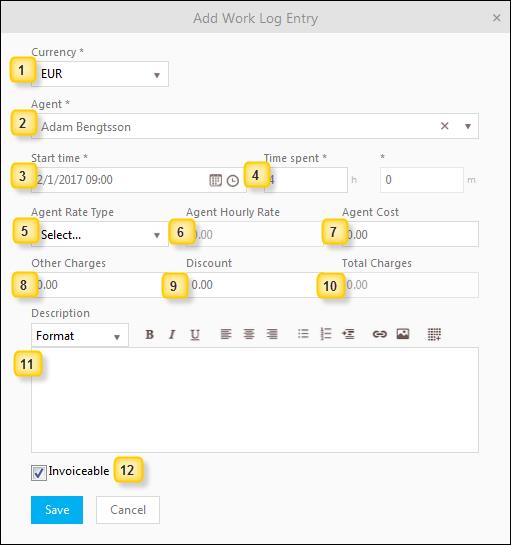
Work log add form
1. Currency: Choose Currency type from dropdown list.
2. Agent: Suggested value same as Ticket Assignee. You can change value of this field and search for a user define in NSP.
3. Start time: When the activity starts. Suggested value is todays date midnight. Adjust the time after that.
4. Time spent: How much time you spent on the activity.
5. Agent Rate Type: Each Agent has his/hers own set of Rate Types. The choice made here defines what hourly rate is going to be charged. Choose the type that correspond to the type of activity that is made.
6. Agent hourly rate: Generated value due to the chosen Agent and Agent Rate Type, and can’t be edited.
7. Agent cost: Generated value due to the chosen Agent, Time Spent and Agent Rate Type.
8. Other charges: Sum of the eventual charges for additional work or services other than just Agent work. Detailed specification of the Other Charges can be put in the Description field.
9. Discount: amount deducted from Agent Cost and Other Charges to form Total Charge. Do not forget to explain reason in the Description field.
10. Total charges: This is the sum of Agent cost, Other charges and Discount.
11. Description: Here you can write information on the log post as well as define what Other charges comprises of and reasons for Discount.
12. Invoiceable: Checkbox used to mark the Work Log for invoice.