Articles are Knowledge base, Articles, Questions or Ideas added by different users. Articles are listed under Forum Stream. Each row in the article list contains icon and Title. By clicking any article in the list, you can open a form to see its details.
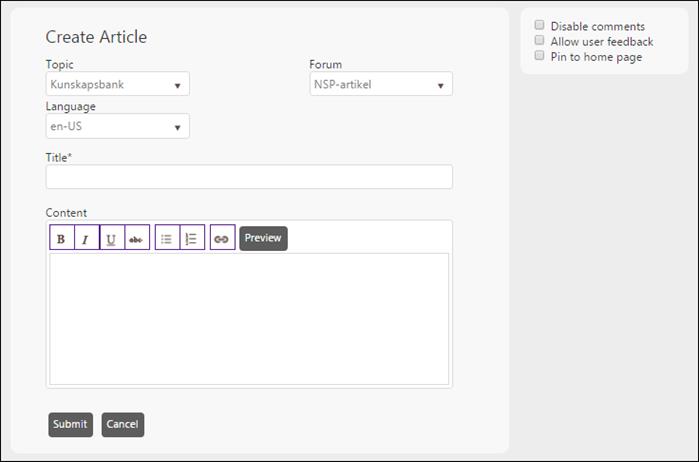
To add a new Article to the Forum stream, click the add articles link provided for the forum stream when you mouse over it. The link opens the Create Article form:
Create Article
The Create Article fields:
•Title: Enter valid and meaningful title for the Article.
•Content: Enter Article text in the textbox. You can preview the content by clicking Preview button.
•Topic: Select Topic from the dropdown list to which you want to add a new article.
•Forum: Select Forum Stream from the dropdown list to which you want to add new article. The content of the dropdown is updated based on the selection of Topic.
•Language: Select language for this article.
•Disable Comments: By enabling this option, you can disable a feature of posting a comment for the article.
•Allow user feedback: This option enables user to use like/unlike buttons when displaying the article.
•Pin to home page: This option is used to put the article on the Home tab. This way the article can be accessed on a quick basis.
After adding required details in the fields, click Save button. This will create a new Article in the selected Forum Stream.
For Agent two links are displayed in the detail page for each article; Edit and Delete. Edit Article form is similar to the Create Article form. When you click the delete link, the system asks for confirmation before the article is deleted.
End User doesn’t have rights to edit the Article detail. They can view the article, post a comment and like or unlike it.