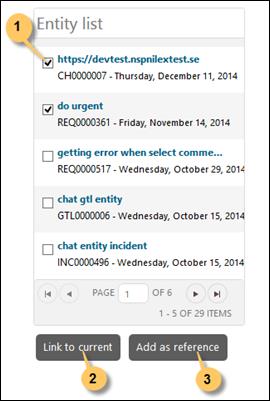
When ticket form is loaded (add new ticket) and search automation is enabled for Description, a list containing search result from Tickets is displayed below the search box as soon as you type in the Description field (press Space to execute the search). Following figure shows an example of search result Tickets:
Entity List
Each item in the list contains a checkbox, ticket Subject and Updated date.
If you mouse over an item a popup containing Subject and Description of the ticket is displayed. Clicking an item opens ticket detail page.
If you check one or more items, two options are enabled; Link to Ticket and Comment link.
Clicking Link to Ticket inserts a link (NSP function Linked Tickets) between tickets. Comment link button adds links to the searched tickets in new ticket´s Description text. Clicking these links opens ticket detail page.