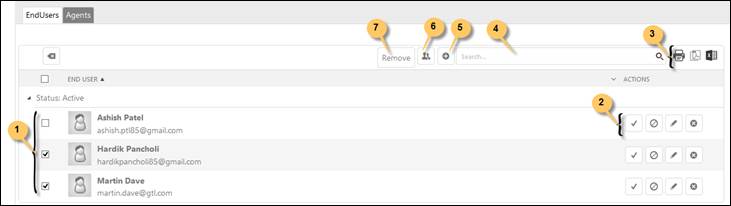
When you edit the organization, End Users and Agents linked to the organization is displayed in the right panel of the page. Below figure shows such a list:
End-users
As shown in the above figure, End Users tab in the right pane a list containing End Users belonging to the organization. The list provides searching, sorting, filtering and paging functionality, export buttons for Print, PDF and Excel similar to other lists in the NSP system.
The list is divided in two parts Active and Inactive users. The button Activate/Deactivate alternate user between those.
Add new record (5) creates a new User to be linked to the organization.
Attach users button (6) is used to link already existing users to the organization. You can link single user by the Link button in the Actions field. Multiple users could be linked by selecting them in the checkboxes and click Add button above the list.
Unlink button unlinks single user from the organization. You can select users by clicking the checkbox left in the list, Remove button (7) is then displayed, and the button unlinks selected users.
After linking is done, click on the Save button to close the process.