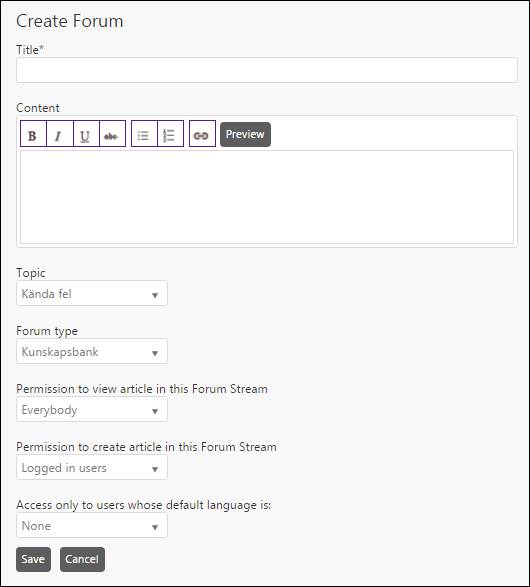
Forum Stream contains Knowledge base, Questions, Articles or Ideas based on the type set for that specific Forum. Forum streams are created and managed by system administrators or Agents given manage permission. Forum streams are added under a Topic. Each Topic listed in the Forum has an Add Forum link. When you click this link, the Create Forum form is displayed.
Create Forum
The fields in the form are:
•Title: Forum Stream name.
•Content: A description of the Forum Stream.
•Topic: Select from the dropdown list containing available topics.
•Forum Type: Select type of the forum from the dropdown list. It can be Knowledge base, Articles, Questions, or Ideas.
•Permission to view article in this Forum Stream: You have to define who can view the topics, Everybody, Logged in users or Agents only.
•Permission to create article in this Forum Stream: Logged in users or Moderators only.
•Access only to users whose default language is: This option allows you to restrict access of the Forum Stream to users based on their properties. In this field a dropdown is available to allow access to users by their default language.
•Access only to Organization: This field is only visible when value other than Everybody is selected in the Permission to view article in this Forum Stream.
After adding all the details, click Save button to create new Forum Stream.
To edit a Forum Stream, click the respective Forum Stream name to open its detail page. Click the edit link provided on the top of the page. This link opens the Edit Forum page, having same fields as Create Forum form except that the Edit form has data already filled in.