A forum stream contains ideas, articles, knowledge base or questions based on the content type set for that specific forum stream. System administrator creates and manages forum streams.
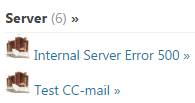
For each forum stream is displayed the name and number of articles it contains inside brackets, e g:
Only first 5 articles are displayed in the list below the forum stream name. To get a list of all articles you have to click the forum stream name to open its detail page. The detail page contains a list of all articles in the forum stream. Search box in this detail page searches for the entered keyword in the selected forum stream and displays the results in the same page.
You can add articles to the forum stream. To add a new Article, there are two ways provided:
1. Mouse over the forum stream name. The add articles link (4) is displayed. Clicking this link opens the Create Article form.
2. Click forum stream name to open the detail page. This page contains Add Article link on the top right.
To see details of an article you click the respective article title, this opens article detail page.