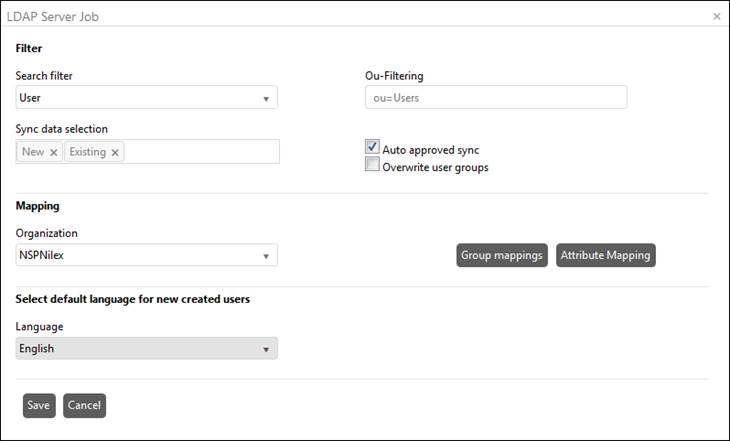
In this list at the bottom of the page created LDAP Server Jobs are displayed. You can add new LDAP Server Job by clicking the button Add new record above the list. The same form is used to Edit an existing LDAP Server Job:
LDAP Server Job
Fields in the form are:
•Search Filter: Select search value to filter users of the Active Directory. Based on the value selected in this field, the users are filtered and synced with NSP. Two values are provided in the list: User and Organizational Unit. If User is selected then only users from the active directory are synced whereas if Organizational Unit is selected then all the OUs are fetched and synced with NSP.
•Ou-Filtering: Filters Organization unit. You can add organization units you want to fetch data from separated with semicolon. Example: ou = Sales; ou = Marketing.
•Sync data selection: Select which data you want to fetch, new one, existing one, or both. If New is selected the synchronization will collect only new users of the Active Directory, in other words, those which are not in the NSP. If Existing is selected the synchronization will collect only users which already exist in NSP. If both options are selected, the synchronization will collect all users. All users will be collected also when nothing is selected.
•Auto approved sync: If not selected a record made by this job has to be later approved in Sync log page.
•Overwrite user groups: If this is checked, the sync will update NSP group membership to current data set in Active Directory. Example: If a user has been removed from a group in AD, then the user will be removed from the corresponding mapped group in NSP too, after the sync. If this is not checked you only update existing data.
•Organization: Select name of the organization to which the users will belong after synced with NSP.
•Select default language for new created users: When a new user is created in NSP (from AD synchronization), the default language for the user will be set to this language.