Mobile Push Notifications are used to send updates or alerts to NSP mobile application users. You can set up the unique and standard format for the notification.
You can create different types of templates for different events. For example, there are two types of Mobile Push templates. One, when a new ticket is created and second one is when the ticket is resolved. The templates reduce the efforts for creating layout and content of the notification each time it will be sent.
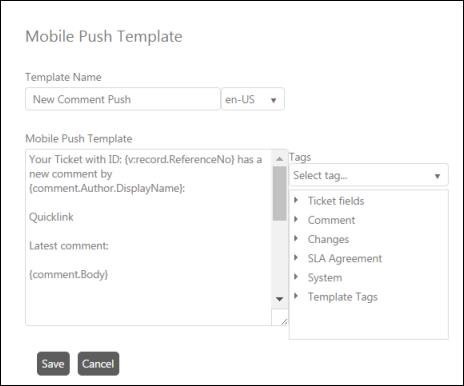
Below figure shows Mobile Push Template form:
Mobile Push Template
This form contains three fields: Template Name, Mobile Push Template and Tags:
•Template Name: Enter the unique name of the template. This field contains two controls: A textbox and a language dropdown list. You first select the language from the dropdown list to define the unique title for the selected language. You can define different names for as many languages as you want.
•Mobile Push Template: Enter the content and layout of the notification.
•Tags: You can enter tags for dynamic fields in the Mobile Push Template textbox by selecting appropriate entity and code displayed beside the textbox. You can simply drag and drop tag or double click the code to include it in the template along with other text. These fields will be replaced with the actual value when actual notification is sent to the user. The parameters in this field are same as the parameters described in Email Template.
After entering the details, click the Save button to create Mobile Push Template.