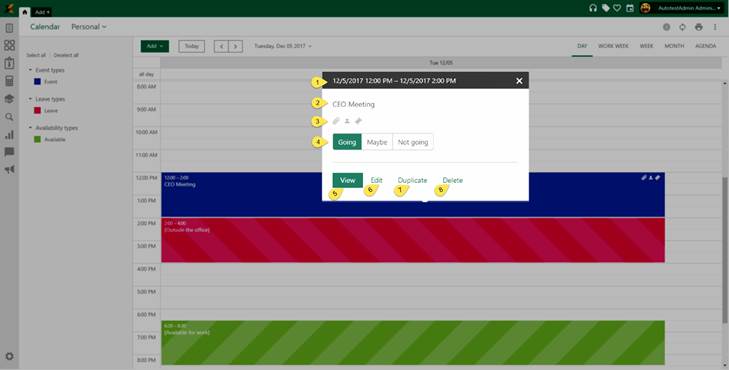
Click on calendar item open popup with additional calendar features.
Calendar features
This popup contains basic item information.
1. Shows an item start-end date and time.
2. Shows an item Name for Event type respectively Description for Leave and Availability types
3.
Icons is shown is an item has additional information (Attachments , Participants
  or Linked tickets
 ). This icons are shown only for event type
items.
). This icons are shown only for event type
items.
4. Response buttons. You can select one of the offered answers.
5. View option opens the view form with all calendar items information.
6. Edit option opens the edit form. Edit form is the same as add item form.
7. Duplicate option is used to duplicate an item. All information will be duplicated.
8. Delete options is used to delete calendar item.