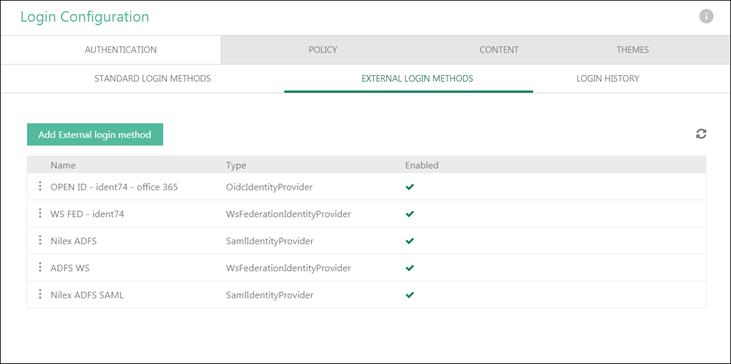
External Login Methods is a function that uses your external providers (Office 365, Active Directory, etc.) credentials to login in NSP.
You can configure NSP to provide Single Sign-On for your users so they do not have to enter separate login credentials for NSP. The authentication of the user is done by an extern identity provider you configure in NSP and the unique user attributes are sent back to NSP. NSP platform in this version has support for three identity providers: OpenID Connect, WS-Federation and SAMLv2.
If you want to use external identification via SSO your NSP installation must be published on https. You need to provide an URL like: https://auth.nspnilex.com.
This page contains a list of all external login method existing in database. Page also offer possibility for adding new external login method, edit or delete existing and activate/deactivate configuration.
The external login method allows Agents and End Users to log in in NSP using login credentials from an external service provider.
External Login Methods
•Name - This column contains Name of the external login method.
•Type - This column contains Type of the external identity provider, OidcIDentityProvider, WsFederationIdentyProvider or SamlIdentityProvider.
•Active - This column contains  if external login method is enabled.
More than one external login method can be activate at the same time. Each
enabled external login method is displayed on login form.
if external login method is enabled.
More than one external login method can be activate at the same time. Each
enabled external login method is displayed on login form.
This list also contains a dropdown action for each login method:
•Edit - This option is used to edit external login method settings.
•View - This option is used to view external login method settings.
•Enable/Disable - This option is used to enable/disable login method.
•Delete – This option is used to delete external login method.
Also you can change position of external identity providers using drag and drop principle.
Add External login method
Just above the list is button Add External login method and by clicking that you can create new external login method.
First step is to select appropriate login method (provider type) from the list. Default types are OpenID Connect, WS-Federation and SAML2.
After selecting login method, you will get a list of default properties which need to be edited based on selected login method.
OpenID Connect
•Name – insert login method name
•Authority - this information depends on the external login method settings
•Client ID - this information depends on the external login method settings
•Client Secret - this information depends on the external login method settings
WS-Federation
•Name – insert login method name
•Metadata Address - insert metadata address, this address depends on the external login method and add following path to the address /federationmetadata/2007-06/federationmetadata.xml
•Wtream – this information depends on the external login method settings
SAML2
•Name – insert login method name
•Metadata Address - insert metadata address, this address depends on the external login method and add following path to the address /federationmetadata/2007-06/federationmetadata.xml
•Entity id – this information depends on the external login method settings
•Service Provider Entity ID - this information depends on the external login method settings