Nilex Network Scanning (NNS for short) is a software used to identify and gather information about computers and other units in a network.
It is possible to gather information about for example hardware, installed applications, network settings, logged in users, program usage, registry information etc.
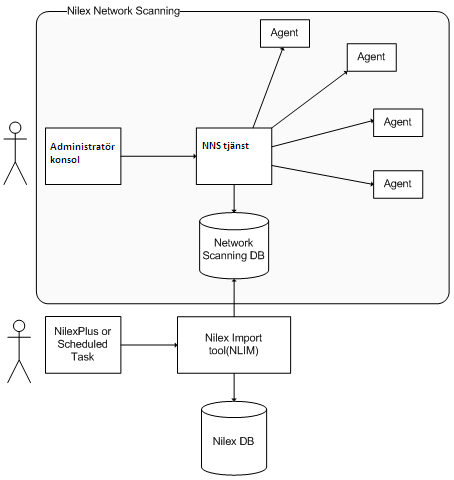
The module is managed by the user from an administration console. From this program, commands are given to the server application Nilex Network Scanning Service (NNS Service) which in turn handles all contact with the client agents and the database. An Agent is a Windows32-application which is installed as a service on the client computer. It is the agent which in the background gathers information about the computer.
Figure 1- Overview
Figure 1 also shows that the transfer from Network Scanning to Nilex Inventory is handled by an application named NLIM.exe. This application is responsible to gather unit information and create or update inventory items in the Nilex Database, according to the user-provided settings.
How to configure NLIM is described in a separate manual. In short there are two ways as shown in the figure to run the application; either by starting it from Nilex “external modules” menu or by setting it up as a scheduled task.