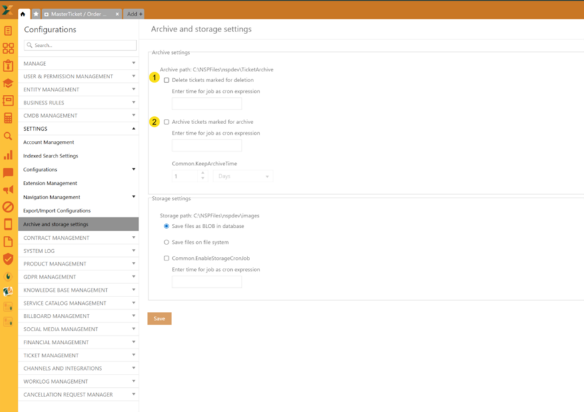
Archive settings
Go to Configuration -> Settings -> Archive and storage settings
Archive settings
On this settings page, you can set two backgrounds jobs for Archive:
1. Delete tickets marked for deletion - If you enable this you need to set job occurrence like cron expression, for example:
0 0 0,13 ? * * * - this means job will run two times a day (12:00 AM and 01:00 PM).
You can check cron exprtession here: https://www.freeformatter.com/cron-expression-generator-quartz.html.
This job will try to delete (hard delete from database) all tickets that have check MarkedForDelete set to 1.
2. Arhive tickets marked for archive - If you enable this you need to set job occurrence like cron expression, for example:
0 0 0,13 ? * * * - this means job will run two times a day (12:00 AM and 01:00 PM)
You can check cron exprtession here: https://www.freeformatter.com/cron-expression-generator-quartz.html
This job will try to archive all tickets that have check IsForArchive set to 1. What this does is it get all ticket data, comments for those tickets and ticket and comment attachments and write all that data on file system. The files are created az zip archive that contains all that data. The location where those files will be is set in app.GlobalSettings table under the key TicketArchiveStoragePath.
You can also set Archive valid time in terms of how much time the archive will exist. The same job will then check arhive and delete an archive where valid time has passed.
Storage settings
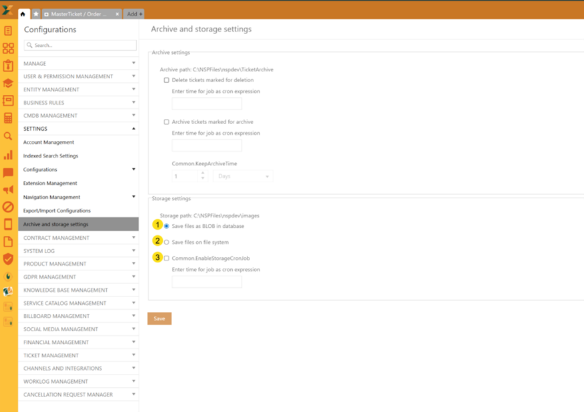 Storage settings
Here we have settings to choose where to save files in NSP (attacments, inline files in ticket description, comments etc)
1. Save files as BLOB in database – that means nothing will change since NSP now uploads all files in database as BLOB data
2. Save files on file system - The location where to save those files is set in app.GlobalSettings table under the key ImageStoragePath.
Once this setting is enabled, the NSP will analyze ticket descriptions, comment texts, attachments and will convert BLOBs into files and store them on file system instead of the database. And by doing that it will preserve database space by reducing database size and keeping files on the file system.
Also, here you can enable storage job by setting the cron expression (3). If you enable this you need to set job occurrence like cron expression, for example:
0 0 0,13 ? * * * - this means job will run two times a day (12:00 AM and 01:00 PM)
You can check cron expression here: https://crontab.cronhub.io/
When this job executes, it will take 50 tickets per execution, starting with oldest tickets, and try to process those ticket descriptions, comments, attachments and extract blobs and move them to file system from database if file system is selected as default storage option.