NSP Nilex system works with third-party secure mail providers to send encrypted emails for ticket comments. This connection lets organizations use their preferred secure mail service to make ticket communication safer. Right now, Logiva A/S secure mail provider is integrated to system. More secure mail providers can be added later. When users add comments to tickets, they can choose to send them through secure mail provider. Recipients need SMS codes to read these messages.
What is Secure Mail Provider Integration?
Secure Mail Provider Integration connects outside secure mail services to NSP ticket system. When this connection is set up, comments sent to ticket owners go through secure mail provider instead of regular email. Outside secure mail provider handles encryption, SMS codes, and safe message delivery. This works like other outside services in NSP (like email providers or SMS services) by connecting outside tools to make system better.
Configuration Setup:
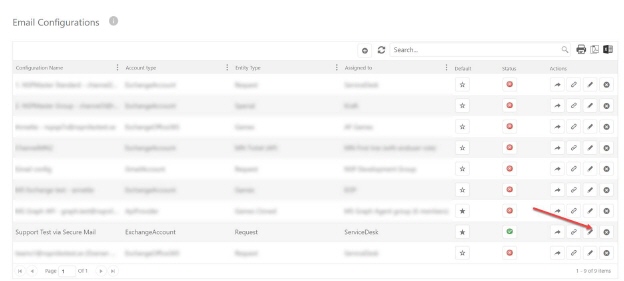
Secure Mail Provider settings are found in Email Configurations section in NSP admin. This page shows all email configurations. Click edit button next to each one to see detailed settings. You can turn on Secure Mail for each email configuration separately.
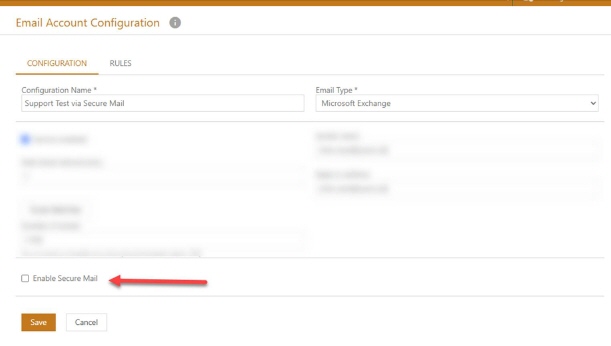
When Secure Mail is turned on, fill in these provider fields:
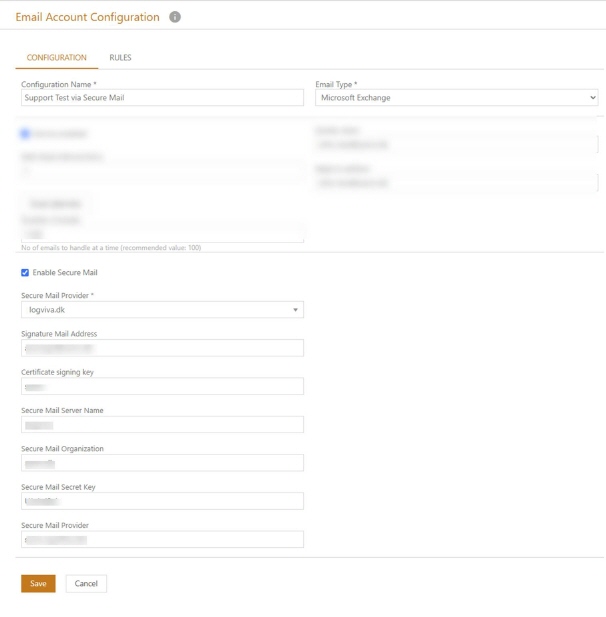
•Secure Mail Provider: Choose from available providers. Currently includes Logiva (logiva.dk). More secure mail providers will be added to this list later.
•Signature Mail Address: Provider address. This address is set by secure mail provider for encrypted emails.
•Certificate Signing Key: Provider key. This key has certificate information needed by secure mail service.
•Secure Mail Server Name: Server name from secure mail provider.
•Secure Mail Organization: Organization name needed by secure mail provider.
•Secure Mail Secret Key: Password provided by secure mail provider.
•Secure Mail Provider Endpoint: Web address of secure mail provider.
Usage Requirements and Conditions:
For secure mail to work, specific conditions must be met in NSP. User's group must match group assigned to email configuration that has secure mail turned on. For example, users in ServiceDesk group can only use secure mail through email configurations assigned to ServiceDesk group. Also, ticket type must match Target Ticket type set in email configuration with secure mail turned on.
System Configuration Requirements:
Email configuration with secure mail must be active. Inactive configurations will not show secure mail option. User must have a phone number saved in NSP. This is needed by secure mail provider for SMS codes. If no phone number exists, system will ask for a number when sending secure mail. This number gets saved in NSP automatically.
* For this system to work properly, email domain on configuration must be supported by a secure mail provider.
Comment Creation Process:
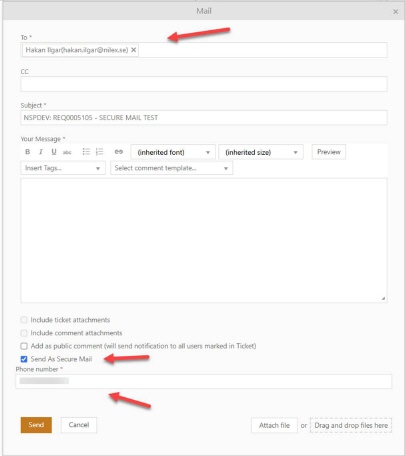
When users want to send comments by email in tickets, they click Send email button in COMMENTS section. If user's group and ticket type match an email configuration that has secure mail turned on, a "Send As Secure Mail" checkbox appears in email dialog. Checking this box sends email through secure mail provider instead of regular email. A phone number field appears when secure mail is selected. It fills automatically if user has a number saved in NSP, or asks for manual entry if not. Phone number must be in format needed by secure mail provider.
Message Delivery Process:
1) SMS Authentication
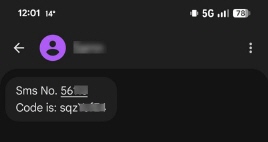
When secure mail is sent through provider, secure mail service sends an SMS to phone number. This SMS has a one-time code needed to read encrypted message. SMS format depends on secure mail provider. For example, format is "Sms No. [NUMBER] Code is: [CODE]" with usually 8-digit codes.
2) Email Notification
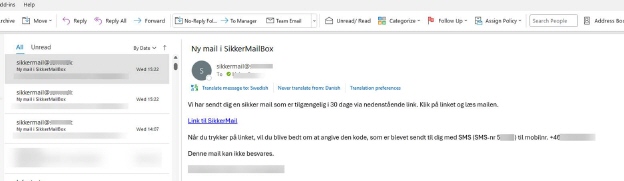
Secure mail provider sends a notification email to recipient with a secure access link. Email content is controlled by secure mail provider. For example, subject is "Ny mail i SikkerMailBox" with an access link labeled "Link til SikkerMail" etc.
3) Secure Access Page
Recipients read encrypted messages through secure mail provider's website. Access page is run by outside provider, not by NSP. Users enter their message ID (usually filled automatically) and SMS code. Look and features depend on secure mail provider. For example, this includes Message ID and SMS code fields with options to resend codes.
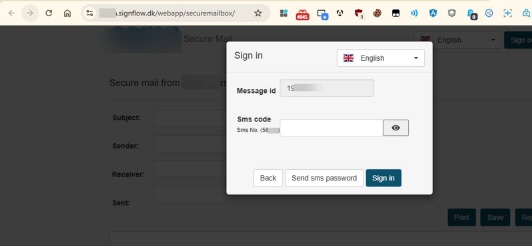
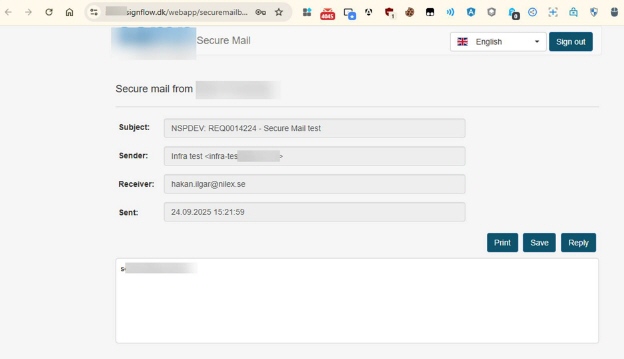
After entering correct code, recipients see encrypted message through secure mail provider's website. Display format, available actions (print, save, reply), and how long messages stay available are controlled by secure mail service. NSP does not control this part because it happens in provider's system.