Views - Sort order
When an Agent click  in left panel, a
list of available views are displayed. The view list is sorted on entities. The
order of entities is configured in the entity editor using the drag-and-drop
option. The order of entities defined there will also be applied in the views.
Each entity menu could be expanded:
in left panel, a
list of available views are displayed. The view list is sorted on entities. The
order of entities is configured in the entity editor using the drag-and-drop
option. The order of entities defined there will also be applied in the views.
Each entity menu could be expanded:
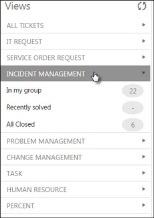
Views in Agent interface
In Views configuration function you can control the
order the views will be shown in list for each entity. When you mouse over the
view list, the cursor is changed to an arrow symbol,  . You can use drag-and-drop to move a view up
or down in the list. As soon as you drop the view at a new position the new
order is saved.
. You can use drag-and-drop to move a view up
or down in the list. As soon as you drop the view at a new position the new
order is saved.
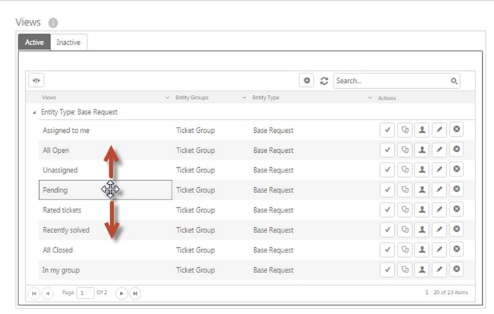
Change View order