In NSP you can setup and monitor Facebook Channels to make support requests. Using Facebook Channels, the wall posts and private messages on the configured Facebook Page becomes tickets in NSP. Agents can respond to Facebook posts from within the NSP ticket, and their comments appear on the Facebook page.
In this page, you can deactivate, unlink, or browse wall posts and private messages for a page you have added. You can determine whether you want to convert wall posts or private message or both to tickets.
To access Facebook Settings page, go to Configurations > Channels > Facebook.
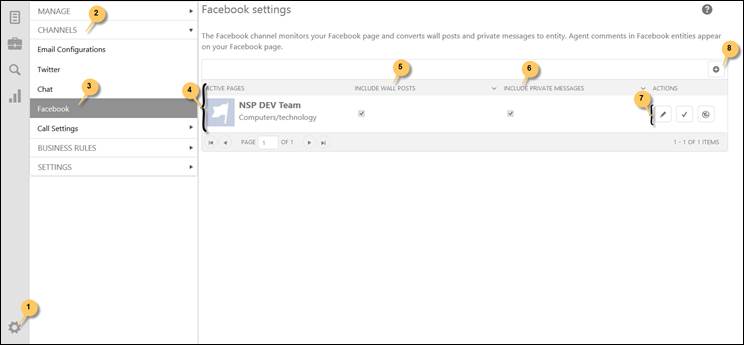
The Facebook Settings are shown in the Figure:
Facebook Settings
The Facebook Settings page lists active Facebook pages set up earlier (4). This is a view to configure and setup number of Facebook page(s) to Facebook channel based on the subscription plan to monitor Facebook page and to convert wall posts and private messages into support tickets.
To add new Facebook Page, an Add new record option is provided (8). This process is explained in detail in the Facebook Detail Page section.
Two check boxes are there in disabled mode (5,6) which determines whether Wall Posts and Private Messages should be converted into tickets or not. If the checkboxes are selected then wall posts and private messages will be converted to tickets. To change this setting, you need to visit Facebook Account Setting provided in Facebook Detail Page page.
Actions provided are:
•( ) Edit button is used to view Facebook Account Setting and
ticket list generated via Wall Post and Private Messages. This page is explained
in the Facebook Detail Page section.
) Edit button is used to view Facebook Account Setting and
ticket list generated via Wall Post and Private Messages. This page is explained
in the Facebook Detail Page section.
•( ) Activate button is used to activate or deactivate the
Facebook Page.
) Activate button is used to activate or deactivate the
Facebook Page.
•( ) Link button is used to link or unlink the Facebook
Page.
) Link button is used to link or unlink the Facebook
Page.
When you click Edit button, Facebook Detail Page is displayed where you can define setting for the Facebook page and view ticket list generated via Facebook channel. Below figure depicts the Facebook Detail Page:
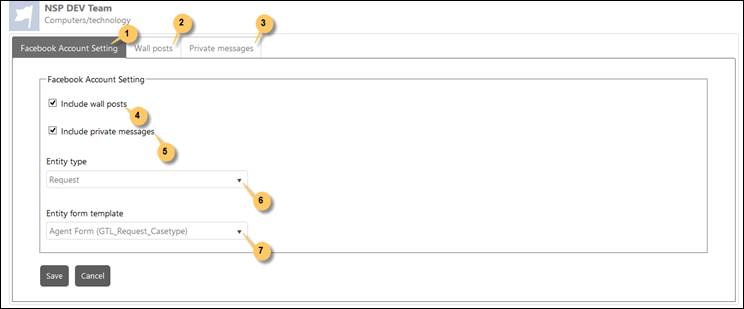
Facebook Page Detail
In this page you can switch between the tabs Facebook Account Setting, Wall Posts and Private Messages.
The Facebook Account Setting Tab is selected by default (1). Under this tab, you can define the setting for Facebook page.
The Wall posts tab (2) or to the Private messages tab (3) you can see the list of tickets generated via Facebook Wall posts and Private messages respectively.
You can check the checkbox Include Wall Posts (4) to enable the conversion of wall posts to tickets. If this is not enabled then wall posts of the page will not be converted to tickets and Wall Posts tab will not be displayed in this page.
You can check the checkbox Include Private Messages (5) to enable the conversion of private messages to tickets. If this is not enabled then private messages of the page will not be converted to tickets and Private messages tab will not be displayed in this page.
You can select the Ticket Type from the dropdown list (6) to which Wall Posts or Private Messages should be converted.
You can select the appropriate template from the Form Template (7) to open converted ticket in selected form. Converted ticket gets opened in selected Form Template whenever it is accessed in NSP.
After every setting is defined, click Save button to save the setting.