 , in Restricted
Ticket Mode form to open Edit Mode.
, in Restricted
Ticket Mode form to open Edit Mode.Restricted Ticket Mode is a feature that could be used to minimize the opening time for a ticket. If Restricted Ticket Mode is in use only most common and important data will be displayed, e g basic data for Ticket and Requester, and the Comment stream.
Setting for Restricted Ticket Mode (if it should be used or not) is available in Agent Portal Configuration. See Agent Portal Configuration. If Restricted Ticket Mode is disabled, tickets will always be opened in Edit Mode.
Status could be changed and comments could be added to
the ticket in Restricted Mode. If other ticket
data should be edited or handled, e g Properties,
Linked Tickets or CIs, Tasks, Work Logs or Merged
Tickets, you need to select Edit, , in Restricted
Ticket Mode form to open Edit Mode.
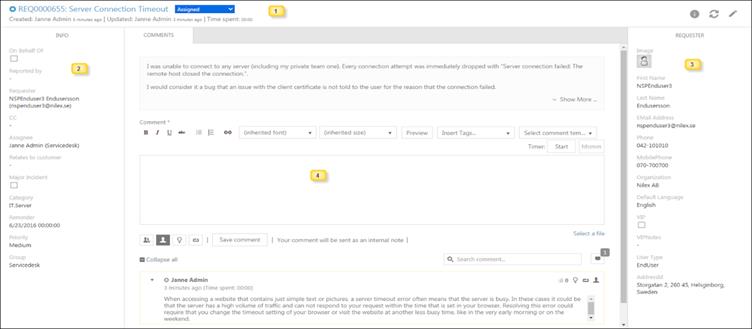
Ticket Restricted Mode
The Restricted Ticket form contains four sections (marked with numbers in the figure):
1. Top header part: Contains Source Icon, Ticket Subject and Id, time information (Created, Updated, and Time spent), and current ticket Status. Status could be changed in Restricted Mode. Status field is a dropdown where you can select new Status. In upper right corner three buttons are available: Info, Refresh and Edit (opens ticket in full Edit Mode).
2. Left panel: Displays main properties of the ticket. The properties could be edited only in Edit Mode. For description of the main properties, see Main properties.
3. Right panel: Displays information of the Requester of the ticket. For description of Requester information, see Main properties.
4. Comment Tab: Middle part of the form contains the Description of the ticket, field to add comment, and the comment stream. Functions are similar to functions available in the Comment tab in Edit Mode form, see Comments.