Calendar
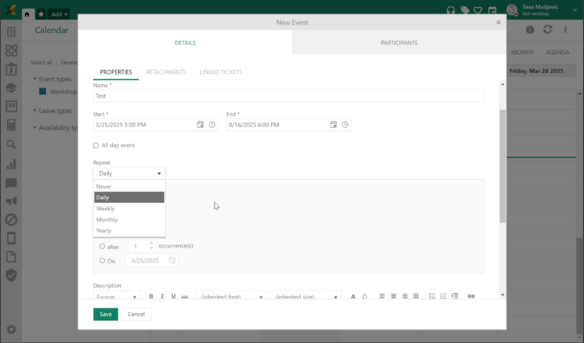
The Calendar function has been enhanced with the ability to repeat a specific event at time intervals. For example, you can schedule an event to repeat every Friday at the same time.
Release December 2025
Configuration
Use Requester’s Organizations in groups on order setting is now moved from Global function settings to Aproval flow configuration as a separate checkmark option. With that function you can configure that behavior on the flow level, instead of previous global level.
Approval flow within business rules has been enchased with new option - Is this the final decision. If this setting is applied, when a group is set as approver, once one group member approves or rejects the order, that decision is final and the other group members cannot revoke it.
A new option for sorting agent menu items has been added - Sort menu items by alphabetical order Use this option to sort the menu items on the configuration page alphabetically.
Within the system ticket views, an out of the box view has been implemented that will display all tickets marked for archiving.
SAML SSO configuration has been improved with the ability to select the
binding method and the option to digitally sign the request. Always sign
Authenticate requests - If enabled, all Authenticate requests will be signed
automatically. Request binding - Choose from available service options
(HTTP Post, HTTP Redirect,Artifact)
When editing a comment, in addition to the username, the time of modification is now visible.
The ability to sort dependent services groups within a service item as well as service items within a group has been implemented. Now, in addition to displaying dependent service items on the SSP in the form of a flat list, it is also possible to display them as a wizard component. To select this layout within a service item, it is necessary to check the option show dependent item as wizard.
The Calendar function has been enhanced with the ability to repeat a specific event at time intervals. For example, you can schedule an event to repeat every Friday at the same time.
Task description can now be edited. Use Edit action on the right bottom of the decsription box and Save.
The e-sign function in this version brings several improvements:
•Possibility to configure notifications in case of signed and unsigned document
•Possibility to set notifications to other users when one party has signed the document
•Possibility to configure automatic insertion of signatories to the document, e.g. if you have a document on a ticket, to automatically add the end-user as a party for signing
•Possibility to preview the signed document in the agent portal
•Inside the ticket, a waiting for signature field has been implemented which can be used within triggers to automate the process
•Improvement in the e-sign layout on SSP in the document signing section – with approve/reject buttons
•E-sign menu on SSP has been moved from the user context menu to the main function menu.
Read more: E-sign
|
Change Notes NSP 12.1.10.0 - release December 2025 | ||
|
Improvements/ Wishes / RFC's |
Category/ Kategori |
Description |
|
REQ0021002 |
Login Configuration |
Login configuration: New settings for always signing Authenticate requests (SAML). This requires a certificate from Nilex AB and was enforced in previous NSP 12 version. Now it is optional to use it. |
|
REQ0021024 |
Approval Flows |
Approval flow - Checkbox final decision has been added. When this is active it is enough that only one person decides if it should be approved or not (does not apply for enforce approve order). |
|
REQ0019052 |
Calendar |
New functionality: Recurring events |
|
Bugs | ||
|
REQ0020988 |
License |
License Management: It was not possible to assign a named user license to a user |
|
REQ0021002 |
Login Configuration |
Login configuration: New settings for always signing Authenticate requests (SAML). This requires a certificate from Nilex AB and was enforced in previous NSP 12 version. Now it is optional to use it. |
|
REQ0020552 |
Login Configuration |
Login configuration: It was not possible to delete configuration records for External login methods |
|
REQ0020727 |
Login Configuration |
Login Configuration: Issue with Open ID not working with Azure |
|
REQ0020819 |
Global Configurations |
Global configurations: Value for "Alternative name" was not saved for Entity Status |
|
REQ0021060 |
Global Configurations |
Global configurations: It was not possible to create new list records for user-defined entities |
|
REQ0020693, REQ0020815 |
Language & Translation |
Login page was not always shown in the chosen default language |
|
REQ0021036 |
Application |
Repeated error messages "Is not possible to find manual url" in Errorlog for the REST site |
|
REQ0020837 |
Manual |
SSP: Information button in ASSETS page pointed to wrong manual page |
|
REQ0020724 |
Roles |
Roles - It was not possible to use old name that has been deleted to use for new role. |
|
REQ0020886 |
User Profile |
AP / SSP: When trying to change password an error occurred |
|
REQ0020767 |
Event Triggers |
Triggers: Actions for "Send message" or "Add comment" did not work |
|
REQ0020769 |
Event Triggers |
Triggers: Action for "Send message" did not work |
|
REQ0020719 |
Event Triggers |
Triggers: Trigger for reopening tickets did not work, regardless of whether you used script or "Set Field" action. Previous script must be modified (in fact all trigger scripts must be checked for errors because of library change for parsing scripts). |
|
REQ0020323 |
Notifications |
KB: Missing Scheduled Notification: The user did not receive the notification. (Setting: Notification triggered after one year) |
|
REQ0020865 |
Entity Editor |
Entity Editor/ Role: Too many entity records were shown under tab System Entity Group |
|
REQ0020802 |
Entity Editor |
Entity editor: An error could occur if you created a Ticket Stage but canceled instead of saving, and then created it again with same name and saved |
|
REQ0020726 |
Entity Editor |
Entity editor - For SSP form it was not possible to set condition for CI property. |
|
REQ0020825 |
Ticket form |
AP Ticket form: It was not possible to connect CIs because an error occurred when loading the list |
|
REQ0020763 |
Ticket form |
AP Ticket form: Problem with showing connected user in the field "Reported by" in the ticket's edit mode. The user was shown in restricted ticket mode, but not in edit mode. |
|
REQ0020423 |
Ticket form |
Ticket form: It was not possible to search for Assignee in Restricted Ticket mode (Simple mode) + auto complete because the records listed showed text "Undefined" |
|
REQ0020783 |
Ticket form |
AP Ticket form: CC field in ticket and in Directmail form could not show Swedish characters properly |
|
REQ0020863 |
SSP, tickets |
Global Function Settings: New setting for showing subtype after form name when selecting ticket form in SSP |
|
REQ0019018, REQ0021008 |
Direct mail |
Directmail: Requester / CC users were not suggested automatically in drop down-list when clicking in To / CC fields |
|
REQ0018179 |
Direct mail |
Ticket Direct Mail: Disclaimer is now added in emails in receivers language in NSP regardless of Agent language. |
|
REQ0020759, REQ0021039 |
Tasks |
Tasks: It was not possible to create or attach tasks, or apply task templates |
|
REQ0013993 |
Service catalog |
SCO view - Service items that where created from existing, mapped properties from those appeared as Error in view. |
|
REQ0018493 |
SSP, Service Catalog |
Cart - It was possible to set quantity to 0 for service item when edited from cart. |
|
REQ0018972 |
Approval Flows |
Order management - Wrong time was displayed in Remark and order date. |
|
REQ0020771 |
Knowledge Base Categories |
KB: System Fails to Save Changes to Category Order |
|
REQ0020752 |
Access Rules |
CMDB - User could copy CI when they did not have permission for it. |
|
REQ0020823 |
CMDB |
CMDB - In maintenance tab, selected template to create automatically was not used. |
|
REQ0020827 |
CMDB |
CMDB - Ticket created through maintenance did not crate relation between CI and ticket. |
|
REQ0020795 |
CI Import |
CMDB - In specific cases import could not finish. |
|
REQ0021012 |
NNS/ SCCM |
CMDB - Issues with NNS import |
|
REQ0020203 |
Mobile, iOS |
Mobile App: The agent could not close tickets and orders |
|
REQ0020202 |
Asset Scan |
Mobile App: The "Scan asset" function creates duplicate entries for the asset's name and inventory number when a new asset is added |