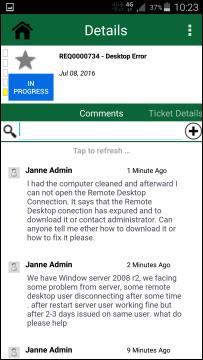
In this section you can view existing comments, search in comments and post new comments. When you open NSP Mobile Details page this Comment section is selected by default.
Ticket Details - Comments
The Comment section includes some features:
•Search: Here you can search for text in the comments or user names who posted comment, etc. Enter search keyword and comments will immediate be filtered so only comments containing entered keyword are displayed.
•New Comment: Tap on Add button  just besides the search box. See Add Comment in NSP
Mobile.
just besides the search box. See Add Comment in NSP
Mobile.
•Below is a
list of comments related to the ticket. Each comment in the list includes
profile picture of the user who made the comment, name of the user, comment
posted date, attachment if any, and the comment text. The attachment icon  is displayed for the comments having
attachment associated.
is displayed for the comments having
attachment associated.
You can swipe down in comment list or Tap to refresh… to Refresh the list.