Initially are not all tickets loaded to the list. Swipe to the bottom of the list, there could be a button, LOAD MORE…. Tap this button to load more tickets to the list.
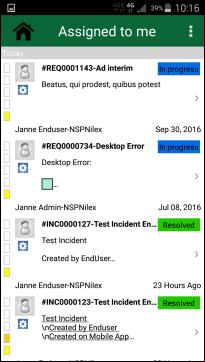
Following figure displays Ticket List for Assigned to me view.
Ticket List
Each part of the list contains a ticket that includes several fields:
•Profile Picture of Requester: If profile picture is not available it shows the default profile image.
•Source Icon: The icon defines the source of the ticket, from where the ticket is originated. It can be System, Facebook, Twitter, Email etc.
•Ticket Id: Displays unique id for the ticket.
•Ticket Subject: Displays subject of the ticket.
•Ticket Description: Displays the beginning of the ticket description.
•Requester name: Displays Name and Organization of the requester.
•Status: A label with ticket status is shown with a colored background.
•Ticket created: Displays time when the ticket was created. It displays full date if the date is before one week. If it is within the week it displays day name with time like Monday 10:45, Tuesday 19:15 etc. If it is within the day it displays e g “1 Hour Ago”, “12 Minutes ago”, etc.
•Priority: The priority is displayed as a vertical dashed line that contains dynamic number of dashes (|). The number of dashes is defined by the web-admin. The color of the dashed line is based on the priority level. It starts from the bottom with light color and color level gets increased with each new dash.
You can use Home button
 to go back to Dashboard.
To see details of a ticket, tap on that ticket in the list. This action opens up NSP Mobile Details page.