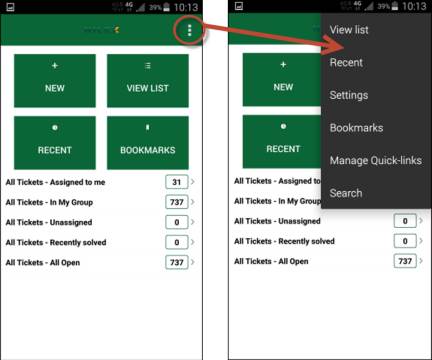
Dashboard Action Menu
Dashboard page can contain 1-4 different buttons for quick access to different functions in the application.
Dashboard contains typically following selections:
•New: Option to create new ticket. See Create new Ticket in NSP Mobile.
•View List: Access the NSP Mobile View List defined in the system. When you tap this button a list of the views along with a counter for number of items in the view are displayed. You can select a view in the list.
•Bookmarks: Tap this button to access the bookmarked items. The Bookmarks page displays a list of tickets you have bookmarked earlier. See NSP Mobile Bookmarks.
•Recent: NSP Mobile Recent Tickets page displays a list of tickets recently updated in NSP.
•Quick Links: Links to Views configured for quick access. Those links can be configured by using Manage Quick Links in NSP Mobile setting. You can select maximum 5 views. View names are displayed together with counter for number of tickets.
In Dashboard and in most
other pages there is an Action Menu button for
open a menu,  :
:
View List, Recent and Bookmarks have same function as the buttons in Dashboard page. Other menu items could typically be:
•Settings: NSP Mobile Settings page, used for e g log out from application.
•Manage Quick Links: Select which views should be displayed in Quick Links list below the buttons in Dashboard. See Manage Quick Links in NSP Mobile.
•Search: NSP Mobile Search.