Self Service Portal provides its users to access knowledge base and topics related to their queries and problems. Forum contains knowledge base, articles, ideas and questions related to the specific subject representing Forum.
There is a provision to add new article, add questions, ideas and new knowledge base to the existing forum. Users can read details of any topic, read comments made on that topic and post a comment.
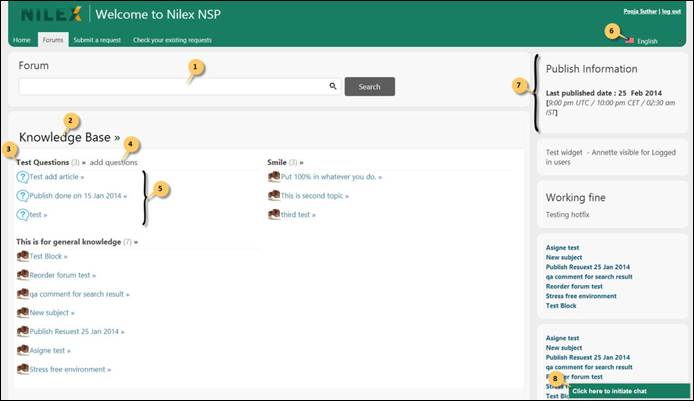
Below figure shows the Knowledge base page of Self Service Portal:
Forums
The page contains search box, Widgets and Forum Topics. When you enter any search keyword in the search box (1), NSP searches the knowledge base for the entered keyword and displays the result on the same page. Below the search box, there is a list of Forum Topics (2).
Each topic has a forum list associated with it that contains various forum streams (3). In the example in the figure we have three forum streams under “Knowledge Base” topic and they are: “Test Questions”, “Smile” and “This is for General knowledge”. Forum streams are created and managed by the system administrator. Each forum stream lists knowledge base, articles, questions or ideas based on the Forum content type it uses (5).
Forum comprises content in a hierarchical order:
•Forum
o Topics
Ø Forum Stream (Articles, Knowledge base, Questions, Ideas)
§ Articles
Forum consists of topics, topic contains forum streams, and forum stream contains a list of articles. All of these elements are explained below.