There are different kinds of ways to log in to the system. Each type of user has a specific role assigned, and based on this you get features specified for this role, create and follow up service tickets and access the Knowledge base. This can be done with one of following alternatives; NSP account, Single Sign-On (Windows AD), External accounts (Facebook, Twitter, LinkedIn, e.t.c.).
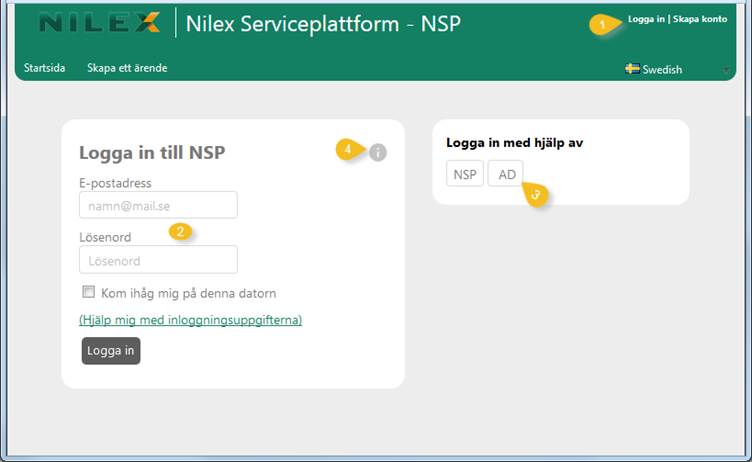
The figure below shows the Login form that opens when you click the link for Login (1) on the top right corner of the form:
Login form
There are three ways of logging in to the system:
•NSP username (an Email address) and password: In this case you must see to it that you have an account as described in the Sign up chapter. This alternative is always available. For this alternative the login form with the fields (2): Email Address and Password is used. There is also a checkbox provided to remember the username for the specific computer. After entering the values, click Login button.
•AD: Use your Windows credentials to log in (3). This function must be enabled and set up by the administrator.
•Single Sign-On: You are automatically logged in when opening the browser with NSP URL. This function must be enabled and set up by the administrator and activated in your user profile)
Help button (4) opens a popup showing help text for login function.