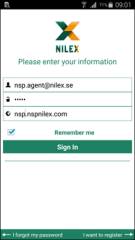
Login is the first page visible when you start the application for the first time.
You login in to Agents interface by supplying User Name (Email Address), Password and domain URL to the NSP site you want to connect.
Login page
Remember me: This field contains a checkbox which allows you to store credentials in the application. If this is checked, the application will remember your login details and you don´t need to enter the information every time you login.
In case if User, Password or Domain is not recognized by the application, an alert message will be displayed.
If login information is correct, the NSP Mobile Dashboard page will be displayed.