Release October 2025
Configuration
The Email Campaigns feature allows you to distribute announcements, offers, or notifications to your customers through the NSP forms. To set the email campaigns, you need to go through the following steps:
1. Create text template for the campaign
2. Define campaign categories
3. Create an email campaign.
Campaign text templates
Text template is used for creating content you want to distribute to specified users via email.
Go to Manage > Text templates > Entity text templates > Email > Add template
The campaign text template has 2 main tabs: Template details and Template text.
In the template details tab, you will need to enter: Name, Description (optional), Entity type (choose Email campaigns), Channel (your active email configuration).

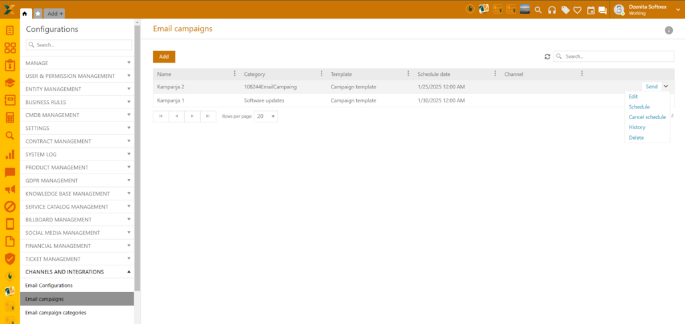
Email campaign: Grid options
Read more: Email campaigns
Health Check is a performance overview of the NSP application and installed and mapped Windows services.
Setup instructions
To set the health check, the following code needs to be added to the appsettings.json of the NSP.ServiceAgent project.
"Agent": {
"InstanceName": "Dev",
"SelfUrl": "http://localhost:5000"
},
Note: The Service Agent controls all services of one computer. For each machine used on one computer, a service agent needs to be set up. For example, if 5 machines serve one agent, 5 service agents are needed.
When Service Agent is run, it immediately contacts and registers at maintenance host at the endpoint http://localhost:12121.
Note that each instance's name and SelfUrl needs to be unique.
Health Check can be used and set for Windows and non-Windows services.
By default, the appsetting.json file includes NSP REST and Web services.
Read more: Health check
Basic pages are introduced as an entity in the NSP and can be used for the distribution of all sorts of information you want to share with your end-users. Created basic pages will be placed on the Homepage of the SSP.
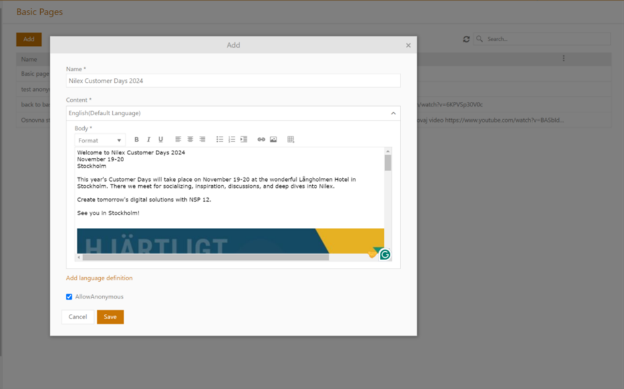
Basic page form contains 3 main sections:
1. Name
2. Content
3. Allow Anonymous checkmark.
Basic pages form: Example
Body text can be formatted as preferred.
If AllowAnonymous field is check marked, your article will be available to all registered and unregistered users.
Content pages can be edited and/or deleted from the grid list.
Read more: Basic pages
This feature allows you to export and/or import NSP configurations.
There are 3 main sections/tabs:
•Export
•Import
•Import History.
Read more: Export/import configurations
Archive option enables archiving the tickets you no longer need in the active ticket view.
Two options are available:
1. Direct Archive ticket (from 3-dot menu on the right) - When used the ticket will be transferred to the folder ARCHIVE at the bottom of the Ticket Views section.
2. Mark ticket for archive (from actions above the grid) – When used, the ticket gets flagged for archive and you can then use Archive and storage settings within Configuration to either delete or archive them (See more details below).
Here we have settings to choose where to save files in NSP (attacments, inline files in ticket description, comments etc)
1. Save files as BLOB in database – that means nothing will change since NSP now uploads all files in database as BLOB data
2. Save files on file system - The location where to save those files is set in app.GlobalSettings table under the key ImageStoragePath.
Read more: Archive and storage settings
The table shows all Work Sites existing in the database.
Just above the table is Add button and by clicking that you can create a new work site. The opened form offers the possibility of defining work site Name (required field) and Description.
This table will also be used for editing or deleting existing Work Sites.
Work site name is unique, so you cannot add more work sites with the same name.
Read more: Work sites
A Kanban board is an agile project management tool designed to help visualize work, limit work in progress, and maximize efficiency. A Kanban view for tickets will give you a better overview of the workload within your organization.
To enable Kanban Ticket View, go to:
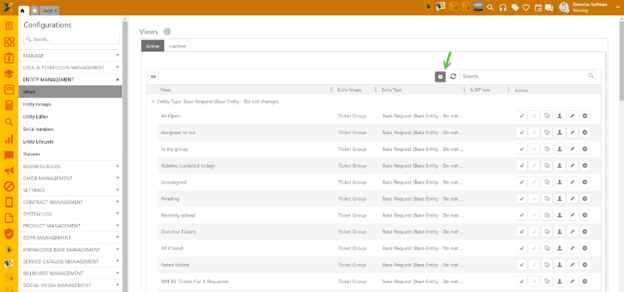
Configurations > Entity Views > Views for tickets and tasks > Add new record (+)

Entity views for tickets and tasks
Read more: Kanban ticket views
When you choose to add or edit the entity Stages, by clicking Edit Stages, the form will be shown where you can define the (database)name, label for different languages, and color code as you want for different stages and associated statuses for each stage. The database name can never be changed once the stages has been saved. If you create your stages, the database name will get the prefix “SysUsrDefEntityname_”. However, you can add an alternative name, which will be displayed to end-users on SSP. An alternative name can also be set for the Entity Statuses in Global Configuration/System tab/ Entity Status.
Read more: Entity Stages
Sharing of the public ticket forms has been improved(user type: Anonymous) with the introduction of the QR Code that is now generated on the last step of the template creation. • QR code – scan qr code to open the form automatically on SSP.
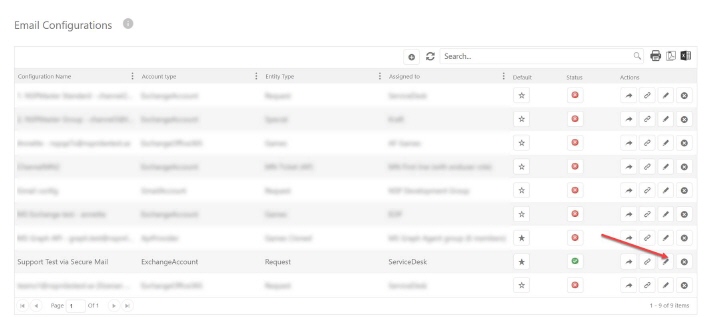
Secure Mail Provider Integration connects outside secure mail services to NSP ticket system. When this connection is set up, comments sent to ticket owners go through secure mail provider instead of regular email. Outside secure mail provider handles encryption, SMS codes, and safe message delivery. This works like other outside services in NSP (like email providers or SMS services) by connecting outside tools to make system better.

Read more: Nilex Secure Mail Provider Integration
NSP Nilex Service Platform integration with TietoEVRY Public 360 provides seamless archival system connectivity for automated document management. This integration automatically transfers support tickets created in Nilex to the Public 360 archive system, creating new cases when tickets are generated and ensuring complete archival of all communications and attachments when tickets are closed.
Read more: Nilex Public 360 Integration
Agent portal
The digital signature allows you to verify and sign all your valuable documents and distribute them within the NSP.
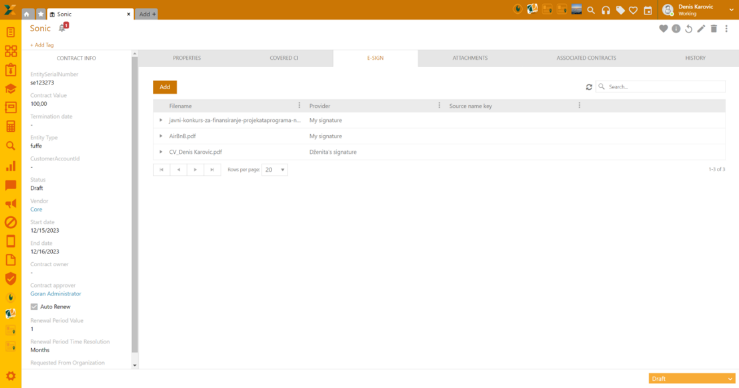
After defining how your digital signature should look, it can be applied to any type of document used in the NSP, or any attachment within CMDB, Contracts, Tickets, and Knowledge Base. Tickets, Contracts, CIs, and Knowledge Base articles on agent portal have a particular tab E-Sign.

E-Sign View on agent portal
Read more: E-signature
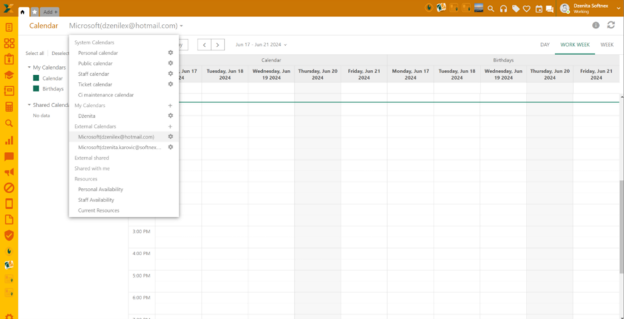
External calendars can be shared with other NSP users by clicking the gear icon next to your external account:

Share external calendar
After this, the calendar form will pop up. You can choose which calendar type you want to share by selecting the Share option from the dropdown menu next to each calendar type. In the next step, you’ll define the users with whom you want to share the calendar. These can be all registered users, specific user groups, or individuals.
Read more: External calendars
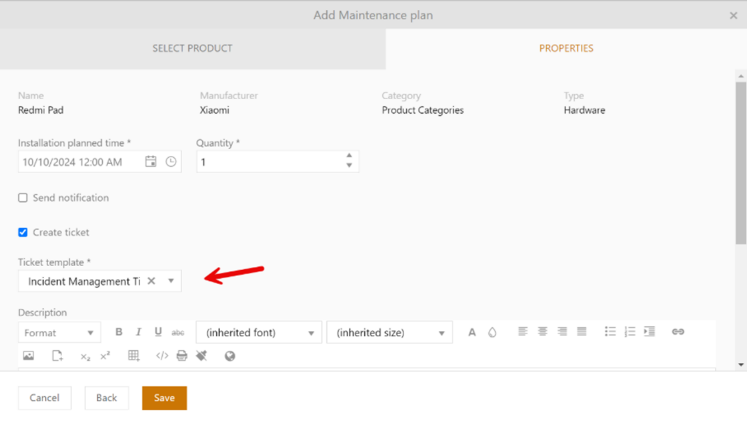
Within Maintenance plan in CMDB a new option has been added – create ticket checkbox. If you activate the Create ticket option, the ticket will be created upon saving the maintenance plan, provided you have selected the ticket template.
Ticket templates are created in the Ticket Data Templates section of the AP Configuration page. Ticket templates can be searched through the dropdown menu or through typing the template name in the property field area.
Add Maintenance plan popup – Create ticket
Read more: CI maintenance plan
Choosing preferred date and time formats in the CMDB CSV Import one time makes it default for further use. However, you can change it whenever you use the CSV import form.
Currently, when adding CI, if Invoicing is enabled, Product property field is marked as required. A condition is now added to check if any charging plan exists and if there are none, the field will not be mandatory.
A new tab Service Items is added to the CI view. Here all attached CIs are visible.
Routing has been enabled in Ticket and CI Views in the Agent portal and SSP, thus enabling direct link sharing.
The flag "Invoicable by default" below has been removed from the AP Configuration/Worklog settings, and from now on the worklog forms decide the default settings for "Invoicable".
Grid search clear now available in the Agent portal and Self-service portal. Click the "x" in the right corner of the search bar to clear content.
Small change: The multi-update grid actions are now shown in the drop-down menu after the CI selection.
Search is now available in the Configuration Menu on the Agent portal. Use the search bar above the menu side bar to type the setting item.
Knowledge base: Improved sorting of KB articles on the Agent portal by adding article names and authors. Improved search by adding filter "Author".
Self Service Portal
The Announcement form has been enchased with subscription history tab in right panel. Subscription history will give you an overview of all data records when the announcement was subscribed to or sent to the users via direct mail.
Read more: SSP Annoncements
Ticket form search is now available in the SSP. Use the search bar to type the form name.
Error message on Add to cart button has been improved when order form is not valid. The error message now shows the list of fields that contain a certain error. The error fields are also highlighted.
|
Change Notes NSP 12.0 - Release October 2025 |
| |
|
Improvements/ Wishes / RFC's |
Category |
Description |
|
REQ0017689 |
Billboard/ Anslagstavla |
SSP Announcements - Subscriptions on categories and direct mail via agentportal |
|
REQ0020206 |
Channels/ Kanaler |
Email campaigns: Feature allows you to distribute announcements, offers or notifications to customers through the NSP forms. |
|
REQ0012512 |
System settings/ Systeminställning |
Archive Tickets & Storage files |
|
REQ0017553 |
Configuration/ Konfiguration |
Export/Import Configurations: New feature allows to export and/or import NSP configurations. |
|
Development |
Ticket Views/ Ärendevyer |
Kanban Boards for Agile Workflows |
|
Development |
E-signing/ E-signering |
E-signing for secure document management |
|
Development |
Connectors |
Nilex Connectors - NSP platform for smart integrations |
|
Development |
Health Check/ Hälsa |
Health Check is a performance overview of the NSP application and installed and mapped Windows services. |
|
Development |
CI Views/ Ticket Views |
Routing has been enabled in Ticket and CI Views in the Agent portal and SSP, thus enabling direct link sharing. |
|
Development |
CMDB |
The multi-update grid actions are now shown in the drop-down menu after the CI selection. |
|
Development |
CI View/ CI vyer |
A new tab Service Items is added to the CI view. Here all attached SIs are visible. |
|
Development |
CMDB |
Choosing preferred date and time formats in the CMDB CSV Import one time makes it default for further use. However, you can change it whenever you use the CSV import form. |
|
Development |
CMDB |
Worksites in CMDB Configuration |
|
Development |
CI Maintenance/ CI underhåll |
CI Maintenance: Add checkbox to create ticket when notification is sent out. When marking create ticket, option to choose ticket data template will appear. |
|
Development |
Entity Editor/ Entitetseditor |
Entity Editor/Edit Stages: Add alternative name for Enduser on SSP |
|
Development |
Knowledge base/ Kunskapsbas |
Knowledge base: Improved sorting of KB articles on the Agent portal by adding article names and authors. Improved search by adding filter "Author". |
|
Development |
Agent Portal Configuration/ Handläggarportal konfiguration |
The flag "Invoicable by default" has been removed from the AP Configuration/Worklog settings, and from now on the worklog forms decide the default settings for "Invoicable". |
|
Development |
Ticket Public Form/ Publika ärendeformulär |
Improved sharing of the public ticket forms (type: Anonymous) with the introduction of the QR Code that is now generated on the last step of the template creation. |
|
Development |
External Calendar/ Externa kalendrar |
Share external calendars |
|
Development |
Price Lists/ Prislista |
Service payment options: This feature enables setting product prices for specific types of products which are then applied to the service items |
|
Development |
Relative Conditions/ Relativa villkor |
New tags for relative conditions: @CurrentWeekStart, @CurrentWeekEnd, @CurrenMonth, @CurrentMonthStart, @CurrentMonthEnd, @CurrentYear, @CurrentYearStart, @CurrentYearEnd |
|
REQ0017286 |
LDAP Sync settings/ LDAP Synk inställning |
LDAP: Column widths can now be adjusted in lists |
|
REQ0018465 |
Tickets/ Ärenden |
Tickets: Improvements to avoid that wrong user being set as creator of ticket |
|
REQ0019315 |
SSP, tickets/ SSP, ärenden |
Application improvements in NSP.Web to improve the stability of RestApi when tickets are created via SSP. |
|
REQ0019245 |
CI Views/ CI vyer |
CI views - Improvement to search to list search results faster. |
|
REQ0017164, REQ0019243, REQ0010732, REQ0011188, REQ0011391, REQ0011805, REQ0014286, REQ0014825, REQ0013386, REQ0019702, REQ0018607, REQ0009644 |
User Profile/ Calendar, Användarprofil/ Kalender |
Improvements for updating the user's presence/availability status in the user profile and calendar |
|
Bugs |
|
|
|
REQ0019517, REQ0010152 |
LDAP |
LDAP: Issue with job freezing at the end of March when Daylight Savings take effect and job was scheduled during invalid hour between 2 and 3 am |
|
REQ0015374 |
LDAP |
LDAP: Field "Comment" was cleared on user in NSP if cleared in AD, even if checkbox "Skip sync from AD if empty value" was used |
|
REQ0012394 |
LDAP |
LDAP: Problems with reaching the "Save"/"Cancel" buttons when editing LDAP job in specific resolution |
|
REQ0018256, REQ0018546 |
Login Configuration/ Inloggningskonfiguration |
Login configuration: Successful logins with method "AD login" were not listed in Login History when filtering on user in combobox. (They could be seen in unfiltered list) |
|
REQ0019383 |
LDAP |
LDAP: Active Directory attributes lastLogon and lastLogonTimestamp can now be mapped to text field in NSP |
|
REQ0018955, REQ0020307 |
KB Notifications/ KB Notifikationer |
The system failed to persist the selected group within the knowledge base (KB) notification condition |
|
REQ0020496 |
Knowledge bas/ Kunskapsbas |
The 'sort by rating' function in the KB is cutting off some of the text |
|
REQ0020230 |
Service Catalog/ Tjänstekatalog |
SC - Text areas field height was not shown correctly on SSP. |
|
REQ0019983 |
Service Catalog/ Tjänstekatalog |
SC - Search did not work for attach article. |
|
REQ0019682 |
Service Catalog/ Tjänstekatalog |
SC - In some rare cases user got locked when trying to create service item from existing. |
|
REQ0019049 |
Service Catalog/ Tjänstekatalog |
SC - In some rare cases user got locked when trying to create service item from existing. |
|
REQ0018247 |
Service Catalog/ Tjänstekatalog |
SCO - Close button in popup window for meta data did not work. |
|
REQ0020035 |
Service Catalog/ Tjänstekatalog |
SCO - In very rare occasions SCO was empty when opened through task. |
|
REQ0018930 |
Order Management |
Order management - Double-clicking on SO number marked more than intended. |
|
REQ0020013 |
Order Management |
Order management - Export button was missing for order details. |
|
REQ0017503 |
SSP, Service Catalog/ SSP Tjänstekatalog |
SC - Under depended services wrong character was shown in price. |
|
REQ0019261 |
SSP, Service Catalog/ SSP Tjänstekatalog |
SC - Dots and number (Order/unorder list) was not displayed in service item description in SSP |
|
REQ0018061 |
SSP, Orders/ SSP, Beställning |
Cart - New language tag has been added which controls the subject after order has been placed. Common.OrderReceiptTitle |
|
REQ0018060 |
SSP, Orders/ SSP Beställning |
Cart - Additional information was shown in English no matter language used. |
|
REQ0020139, REQ0016411, REQ0018948 |
SSP, Assets/ SSP, Inventarier |
Assets - Export did not work for some. |
|
REQ0018499 |
CMDB |
CMDB - In history it was not shown when user opens a CI. |
|
REQ0018910 |
CMDB |
CMDB - In CI when clicking on Vendor nothing happened. |
|
REQ0019319 |
CMDB |
CMDB - In CI views, made it possible to search for date. |
|
REQ0019487 |
CMDB |
CMDB - In relations tab if there is a user, clicking on user did not load information if there was no google maps API key active in NSP. |
|
REQ0020267 |
CMDB |
CMDB - Import was not workings as intended for property date & time |
|
REQ0020305 |
Entity Lifecycle/ Livscykel |
Entity lifecycle - It was not possible to delete stages. |
|
REQ0019455 |
BUSINESS RULES/ Affärsprocesser |
Approval Flow Limits - It was not possible to add new members. |
|
REQ0019802 |
Ticket Notifications/ Ärendenotifikationer |
Notifications: Mail tags for Solution comments did not work in notifications when direct closing a newly created (unsaved) ticket |
|
REQ0020350, REQ0016767 |
Document templates/ Dokumentmallar |
Document templates - setting to download the file as PDF was ignored and the template file type was used instead. |
|
REQ0016102 |
Entity Editor/ Entitetseditor |
Entity Editor: Entity Editor: Error when deleting ticket entity type is solved |
|
REQ0016511 |
Entity Editor/ Entitetseditor |
Entity editor, forms: Issue in SSP forms with "Insert line break" checkbox not working as expected |
|
REQ0018591 |
Entity Editor/ Entitetseditor |
Entity editor: Not possible to set Inner description on field "CI" on entity "Base Request" because of error message "Please select parent field for tree view type" |
|
REQ0019105 |
Entity Editor/ Entitetseditor |
Entity editor, forms: If a component (e.g. a combobox) was used as visibility condition for another component (e.g. a checkbox), and you removed the first component from the form, then you could not set a new visibility condition for the second component. |
|
REQ0020372 |
User & Permissions/ Användare & Behörighet |
Users - CI tab was empty for regular agents. |
|
REQ0019190 |
Start Page (not logged in)/ Startsida (Ej inloggade) |
SSP Configurations: Issue with white text on white background on login page. "Secondary text color" is now used instead of "Accent color" on login page as well (i.e. same as on logged-in page). |